Binding Syntax
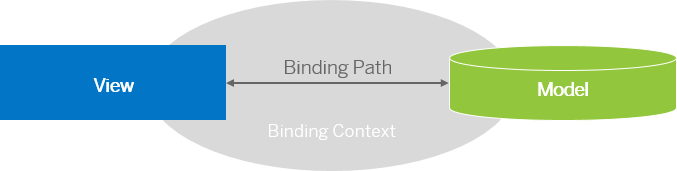
When defining a binding path for a control, a binding context is created which connects this control to a data model. The UI control then gets the data through that context and displays it on the screen.
This image is interactive. Hover over each area for a description. Click highlighted areas for more information
Simple Binding
To reference model data in a view , you can use the simple binding syntax
"{/path/to/data}":
<Input value="{/firstName}"/>You can add other properties, such as formatters, data types, or events:
-
Data type:
<mvc:View xmlns:core="sap.ui.core" xmlns:mvc="sap.ui.core.mvc" xmlns="sap.m" core:require="{StringType: 'sap/ui/model/type/String'}"> <Input value="{path: '/firstName', type: 'StringType'}"/> -
Formatter:
<mvc:View xmlns:core="sap.ui.core" xmlns:mvc="sap.ui.core.mvc" xmlns="sap.m" core:require="{globalFormatter: 'my/globalFormatter'}"> <Input value="{path: '/firstName', formatter: 'globalFormatter'}"/> -
Event:
<Input value="{path: '/firstName', events: {dataRequested: '.onMyDataRequested'}"/>
For more information, see Binding Path.
For more information about data types and formatters, see Formatting, Parsing, and Validating Data.
Composite Binding
If a control requires data from multiple different model properties, you use a parts array of paths to define
composite binding paths:
<mvc:View
    xmlns:core="sap.ui.core"
    xmlns:mvc="sap.ui.core.mvc"
    xmlns="sap.m"
    core:require="{globalFormatter: 'my/globalFormatter'}">

    <TextArea binding="{birthday}" value="{
        parts: ['day', 'month'],
        formatter: 'globalFormatter'
    }"/>
For more information, see Composite Binding and Examples for Data Binding in Different View Types.
Expression Binding in XML Views
Expression binding is a simple way to calculate values directly in the view. For example, if you want to change the color of the price depending on whether it is above or below some threshold. With expression binding you don't have to declare a separate formatter:
<ObjectStatus state="{= ${products>UnitPrice} > ${/priceThreshold} ? 'Error': 'Success' }"/>For more information, see Expression Binding.
Property Metadata Binding for OData Services
With metadata binding, you can bind properties of a control to the corresponding property that is defined in the metadata of an OData service:
<Input maxLength="{/#Company/ZipCode/@maxLength}"/>For more information, see Property Metadata Binding.
Escaping Binding Syntax
To prevent string values from being misinterpreted as binding expressions in ManagedObject's constructor
settings or applySettings, use the static helper function sap/ui/base/ManagedObject.escapeSettingsValue, which escapes
special characters, such as curly braces
({}):
// ManagedObject required from "sap/ui/base/ManagedObject"
// Calling the constructor with the settings object
new MyTextControl({ // or in applySettings({ ...
    text: ManagedObject.escapeSettingsValue(textFromBob) // no binding intended
});
Especially if the given value is not under your control, e.g. a value from users or data services, omitting
escapeSettingsValue in the above scenario can lead to a SyntaxError reporting "no closing braces
found", or getProperty returning undefined due to the framework interpreting unintended binding
expressions.
In contrast, ManagedObject's setProperty does not check for bindings and can be used without
escapeSettingsValue:
new MyTextControl().setText(textFromBob);
To use composite binding, expression binding, and the escapeSettingsValue function, the SAPUI5 bootstrap configuration parameter
sap-ui-compatVersion must be set to edge.