Extension Points for Subsections on the Object Page
Use app extensions with caution and only if you cannot produce the required
behavior by other means, such as manifest settings or annotations. To correctly
integrate your app extension coding with SAP Fiori elements, use
only the extensionAPI of SAP Fiori elements. For
more information, see Using the extensionAPI.
After you've created an app extension, its display (for example, control
placement and layout) and system behavior (for example, model and binding usage,
busy handling) lies within the application's responsibility. SAP Fiori elements
provides support only for the official extensionAPI functions.
Don't access or manipulate controls, properties, models, or other internal
objects created by the SAP Fiori elements
framework.
In SAP Fiori elements for OData
V2, you use
the term facet to add a subsection to the object page in the
manifest.json
file.
In SAP Fiori elements for OData
V4, you use
the term section to add a subsection to the object page in the
manifest.json
file.
You can add additional subsections in existing facets:
-
BeforeSubSection: The extension is inserted before a given subsection in a facet -
AfterSubSection: The extension is inserted after a given subsection in a facet -
ReplaceSubSection: The extension replaces an existing subsection in a facet.
You must specify the subsection in the form of its annotation path. You also have to
specify the entitySet name, as the same annotation path may exist for various entity
sets. You add this information to the manifest.json file, as
shown
in
the
following
sample
code:
For more information, see Extension Points for Sections on the Object Page.
"sap.ui.viewExtensions": {
   "sap.suite.ui.generic.template.ObjectPage.view.Details": {
      "BeforeSubSection|STTA_C_MP_Product|to_ProductSalesData::com.sap.vocabularies.UI.v1.Chart":{
         "className": "sap.ui.core.mvc.View",
         "viewName": "STTA_MP.ext.view.ProductSalesPrice",
         "type": "XML",
         "sap.ui.generic.app": {
            "title": "Target Sales Prices",
            "enableLazyLoading": true
         }
      },
      "AfterSubSection|STTA_C_MP_Product|to_ProductSalesData::com.sap.vocabularies.UI.v1.LineItem":{
         "className": "sap.ui.core.mvc.View",
         "viewName": "STTA_MP.ext.view.ProductSalesPrice",
         "type": "XML",
         "sap.ui.generic.app": {
            "title": "Target Sales Prices",
            "enableLazyLoading": true
         }
     "ReplaceSubSection|STTA_C_MP_Product|to_ProductTextType::com.sap.vocabularies.UI.v1.LineItem":{
         "className": "sap.ui.core.mvc.View",
         "viewName": "STTA_MP.ext.view.ProductSalesPrice",
         "type": "XML",
         "sap.ui.generic.app": {
            "title": "Target Sales Prices",
            "enableLazyLoading": true
         }
      },
    .....
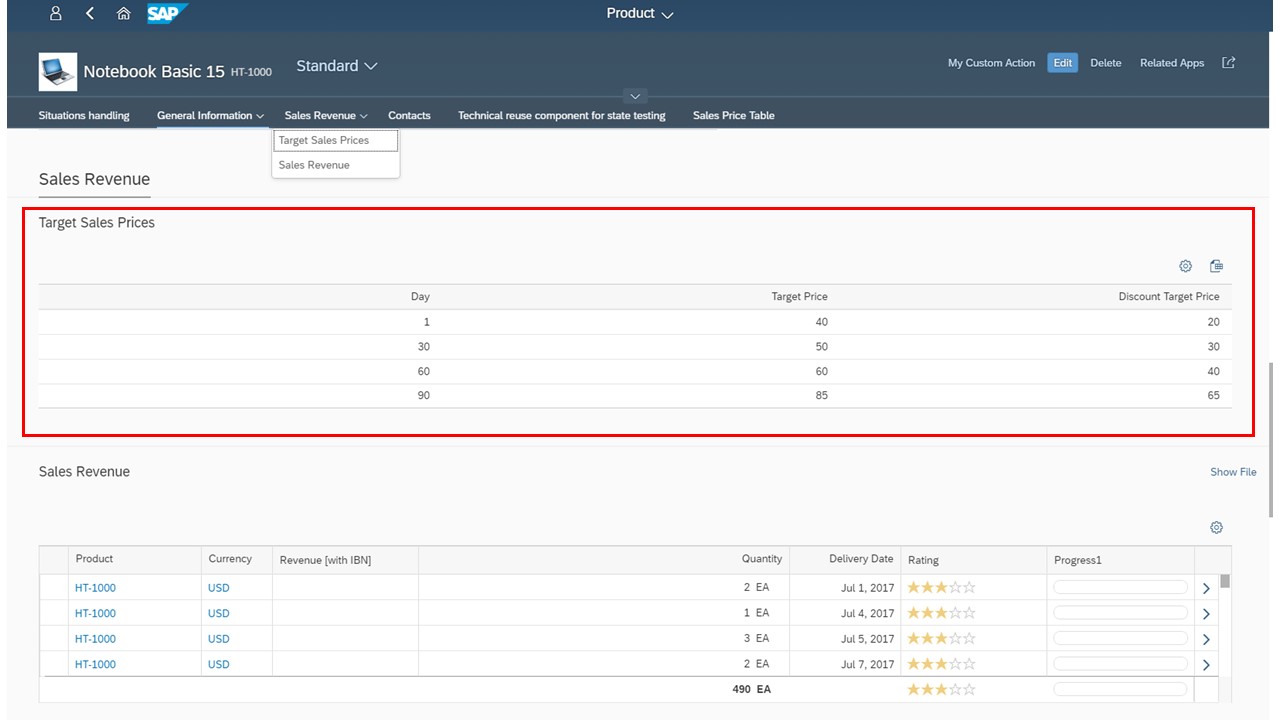
The result looks as shown in the following screenshot. The highlighted subsection has been added using the extension point.
For more information about extension points for sections, see Extension Points for Sections on the Object Page.
For more information about lazy loading for custom sections, see Enabling Lazy Loading for Custom Sections.
You can specify either a view or a fragment contained in the additional
subsection. Either way, you do not need to use the object page (uxap) tags
ObjectPageSection, subSections, or
ObjectPageSubSection. These definitions are already
part of the template for the object page view. Additional sections are
rendered if an extension exists.
Using Custom Subsections
Custom subsections provide the following features:
-
adding arbitrary subsections using an
xmlfragmentdefinition. -
positioning relative to subsections defined by facets or other custom facets.
-
using a localized subsection title.
To define a subsection on UI level - you do this if you want to add a custom look
and feel, or to use controls that are not supported by default - you can extend
the settings of the corresponding object page in the
manifest.json
file
with
a content block. You can enrich the body of the object page
with additional subsections. To do so, you define header facets by using a
custom key that you later reference by providing the following properties:
-
a title
-
the name (which must point to the corresponding fragment and the outer section, which can be just the name of an existing section or a custom section)
-
the corresponding fragment
{
	"sap.ui5": {
		"routing": {
			"targets": {
				"SalesOrderManageObjectPage": {
					"options": {
						"settings": {
							"content": {
								"body": {
									"sections": {
										"myObjectPageSection": {
											"subSections": {
												"customSubSection": {
													"type": "XMLFragment",
													"name": "SalesOrder.ext.CustomSubSection",
													"title": "{i18n>customSubSection}",
													"position": {
														"placement": "After",
														"anchor": "someSubSection"
													}
												}
											}
										}
									}
								}
							}
						}
					}
				}
			}
		}
	}
}
The result looks as shown in the following screenshot. The highlighted subsection has been added using the extension point.
For more information, see Extension Points for Sections on the Object Page.
You can specify either a view or a fragment contained in the additional
subsection. Either way, you do not need to use the object page (uxap)
tags ObjectPageSection, subSections,
or ObjectPageSubSection. These definitions are already
part of the template for the object page view. Additional sections are
rendered if an extension exists.
Live Example: Custom Subsection
You can explore and work with the coding yourself. For more information and live examples, see the SAP Fiori development portal at Standard Floorplans - Extensions - Extensions for Object Pages - Custom Subsection.
Ensure that you have a defined LineItem service available
(service.cds in the linked example).